Describe the process. Get a running workflow.
Turn the processes that live in people's heads into automation that runs itself designed in a visual editor inside Microsoft Teams, on your own Microsoft 365 data, in your own tenant. No new tools, no developers, nothing leaving your control.
Automation that understands the business
The contract that should be reviewed before it renews. The new joiner who needs six things to happen in order. The request that must reach the right team before its deadline. pEntities turns each of these into a process that runs itself, without anyone remembering to start it.
Trigger. The event that starts the process a date, a change in a record, a new file, an incoming email. Defined once, it runs from then on.
Conditions. The rules that decide which path the process takes, applied to live data at the moment it runs.
Actions. What happens next produce a document, send an email, assign a task, notify a team, update a record, or reach an external system.
Full audit trail. Every run is recorded: what ran, on what data, what came out and what went wrong. Available for review at any time.
One visual designer, inside Microsoft Teams
Build automation where the work already happens. No separate portal, no separate login, and nothing that reaches data the person who owns it couldn't reach themselves.
Design it by drawing it
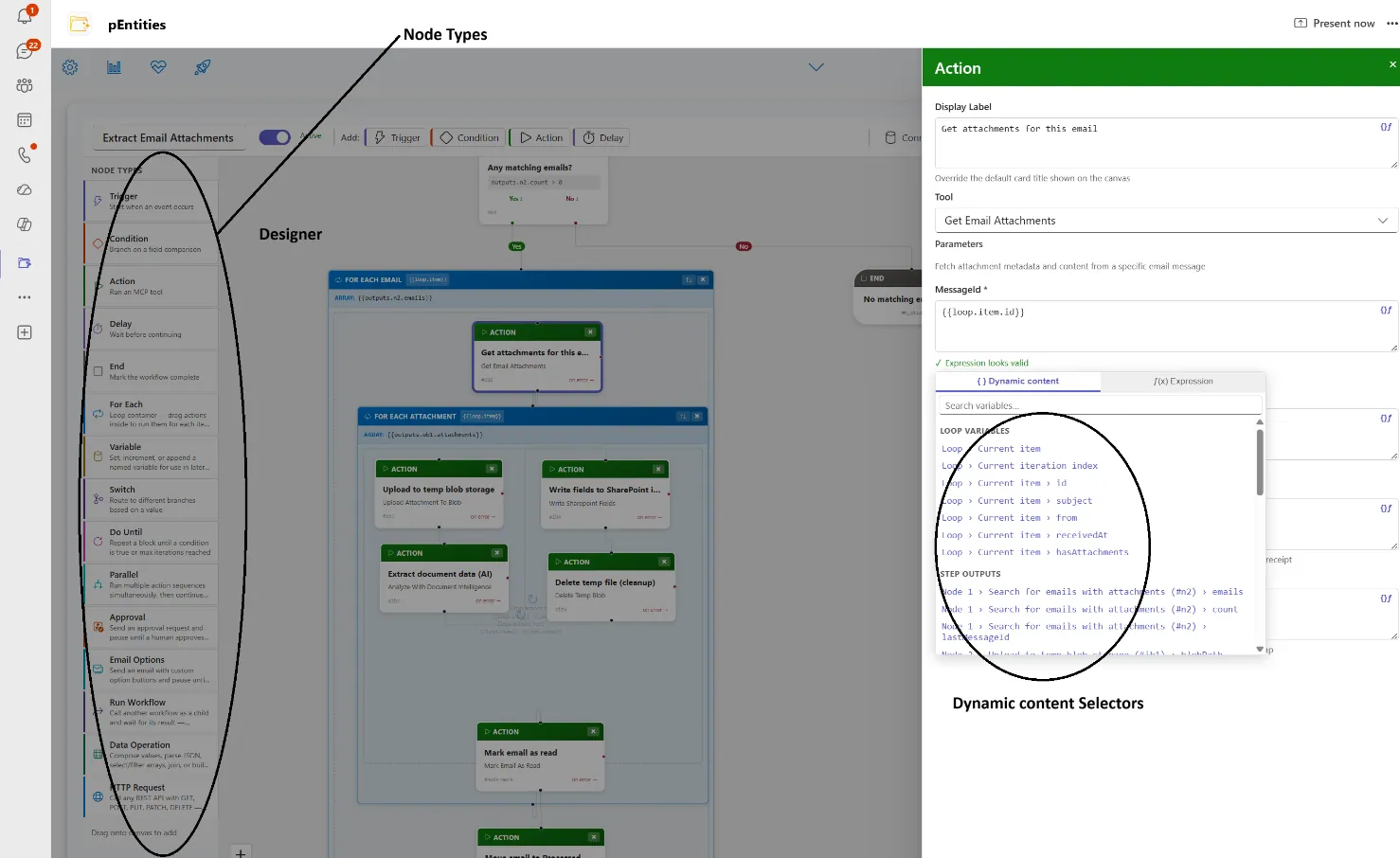
Processes are built by dragging steps onto a canvas and connecting them. Branches label themselves, repeating and simultaneous work is grouped visually, and a process that is used often can be saved once and reused inside others.
What takes a specialist weeks in a traditional automation tool takes an informed business user an afternoon and the result is a diagram anyone in the room can read.
Nearly 40 ways a process can start
A workflow begins when something happens in the business, and pEntities is listening across the whole of Microsoft 365:
- Records & documents a record created or changed, a file added in SharePoint or OneDrive.
- Email, Teams & calendar a message matching your criteria, a channel post, an upcoming meeting.
- A schedule once, or hourly, daily, weekly or monthly between two dates.
- Business events leave submitted, training expiring, a contract renewing, a request nearing its deadline, a budget threshold crossed.
Over 40 things it can do next
Workflows follow rules, repeat, run several streams at once and wait for people exactly as your real process does:
- Email & documents send and file correspondence, generate documents from templates, read and summarise attachments.
- Approvals that wait a decision can wait days or weeks. Ask by email with your own buttons Renew, Renegotiate, Let it lapse and the process continues from the answer. No app, no login.
- Built-in intelligence extract data from invoices and contracts, compare documents, spot patterns and flag exceptions.
- Your other systems the workflow can call an external application or database when the process needs one.
Workflows you describe in a sentence and can trust in production
Most automation projects stall before they start, because nobody is sure what to build. Blueprint removes that step: describe the problem in plain language and the workflows are designed, checked and placed on the canvas ready to review, rehearse and put live.
Describe the problem in a sentence. Get the workflows that fix it.
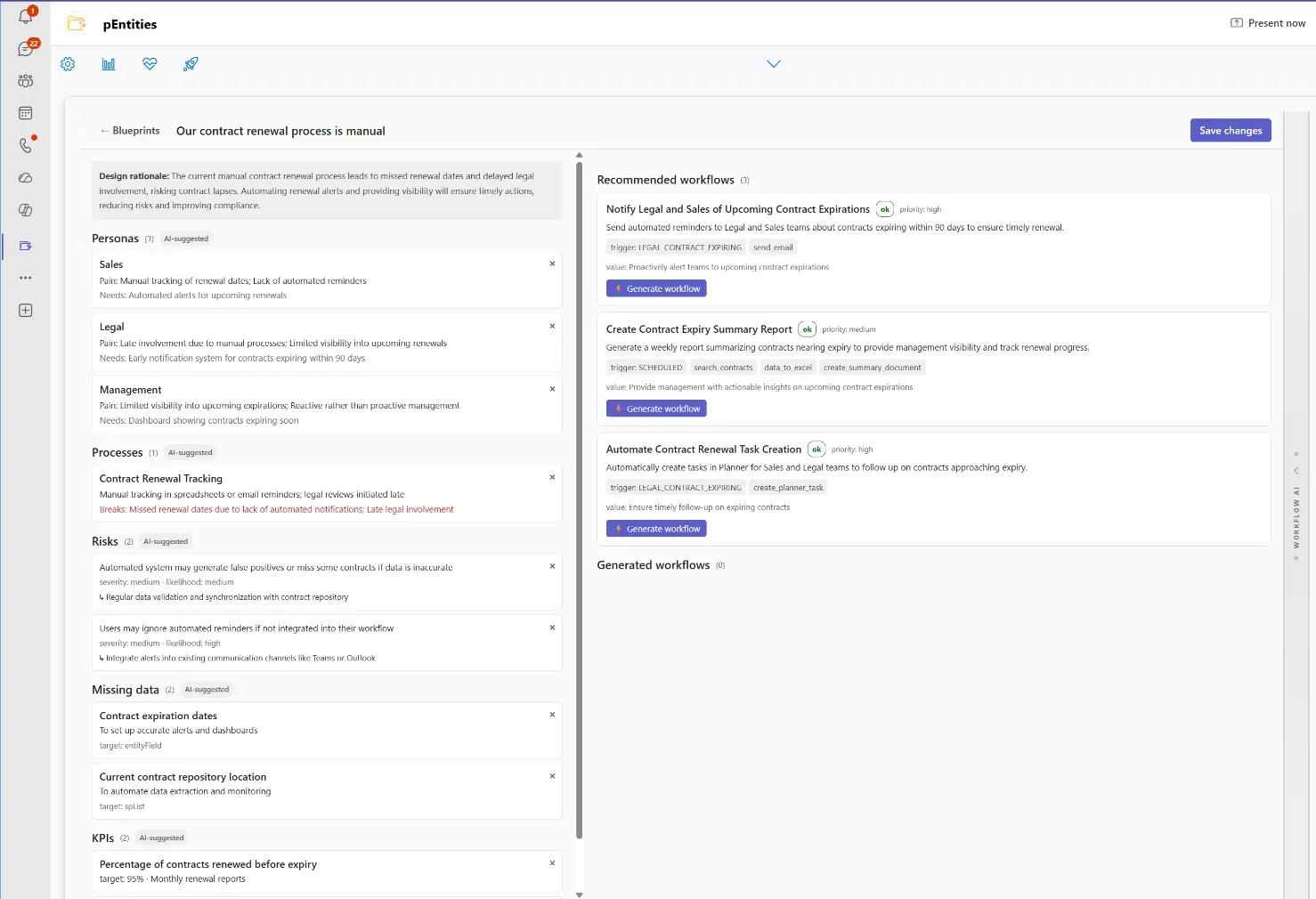
"Sales misses renewal dates and Legal is brought in too late."
That one sentence is the whole brief. Blueprint reads it the way an experienced consultant would who is involved, where the process breaks, what it is costing and what should be measured then turns the diagnosis into working automation.
- You describe the problem in the language you would use in a meeting. No process maps, no requirements document, no technical detail.
- It diagnoses the process the people involved, the steps that fail, the risk being carried and the measures that would show improvement.
- It prescribes the workflows a short list of concrete automations, each one explained in business terms with the benefit it delivers.
- It builds them for you the workflows you approve are created on the canvas, fully formed and ready to review, adjust and put live. Nothing is left as a suggestion.
It can only propose what the platform can genuinely do. Every recommendation is verified against the real catalogue of triggers and actions before you ever see it, so what appears on the canvas is always something that will actually run.
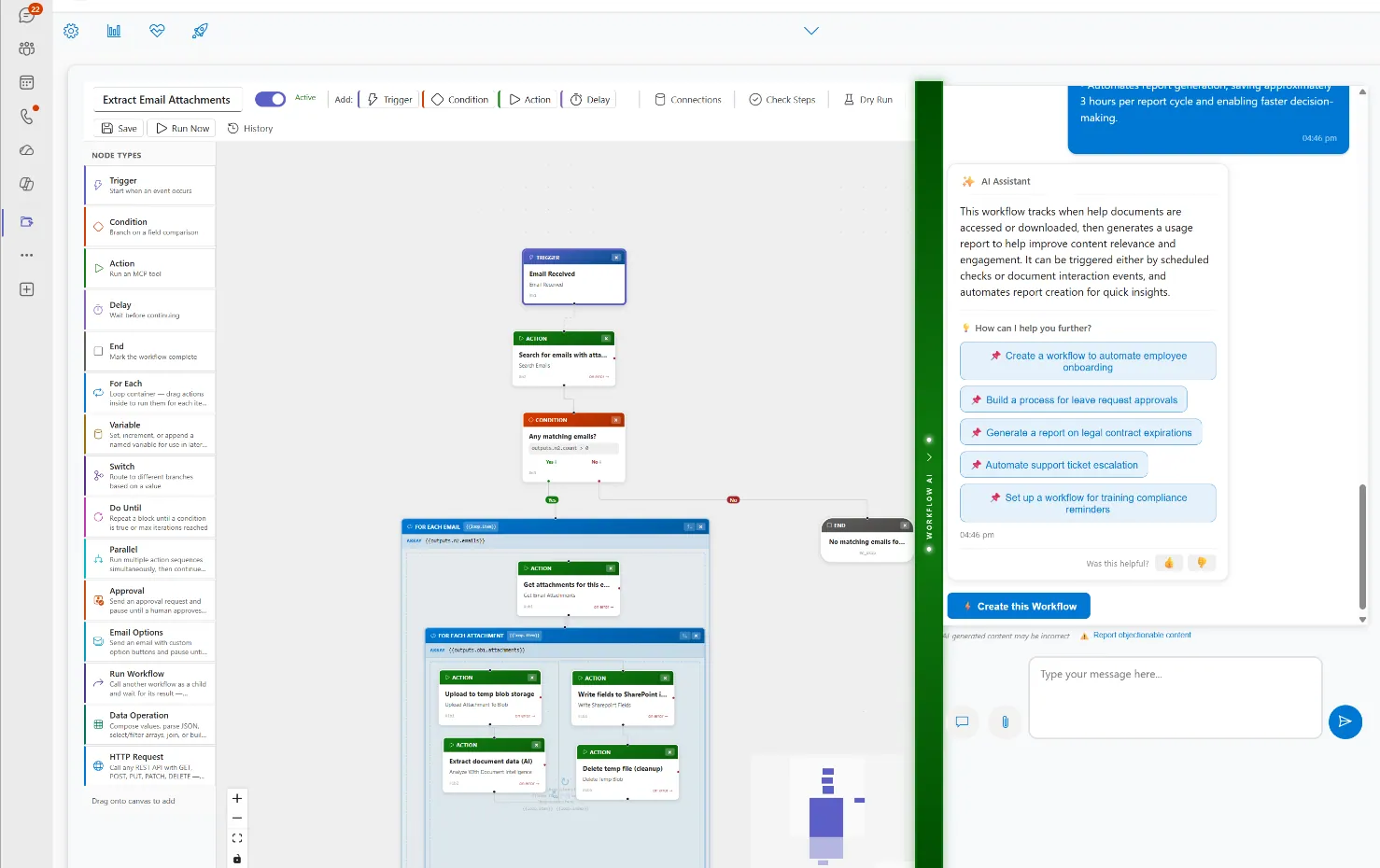
Day to day, the Workflow Advisor continues the same conversation beside the designer. It reads the context you are working in, points out automations worth having, builds the one you describe in a sentence, and answers questions as they come up so the second and third workflow are as easy as the first.
Check it, test it, watch it run
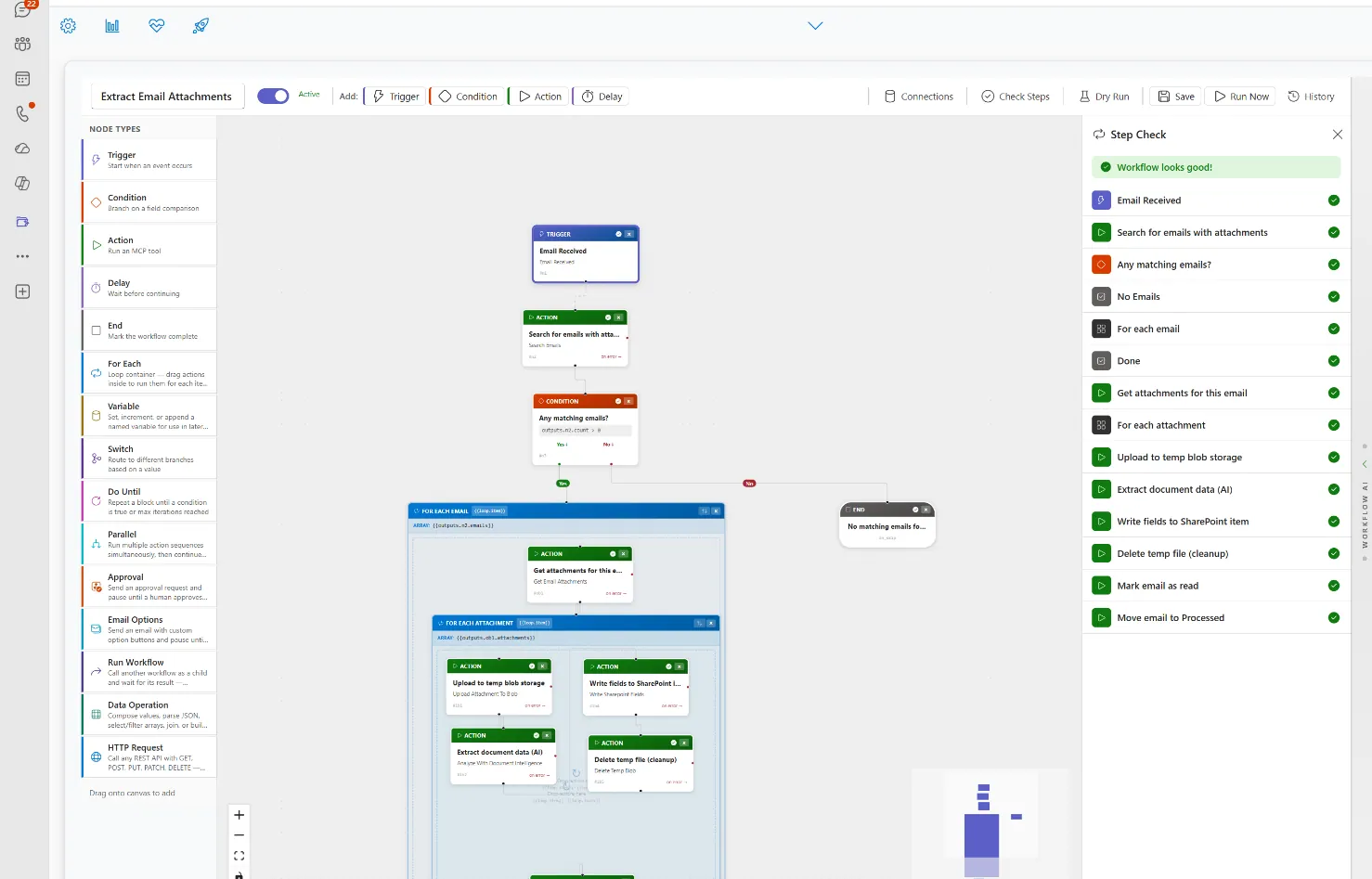
Before a workflow is published, pEntities checks it end to end and points out anything that would fail: a step that can never be reached, a rule with no outcome, a loop with no stopping point.
You can then rehearse it on real data without affecting anything, and see exactly what each step would do and which path it would take. Once live, every run is listed step by step with its status, duration and any errors updating as it happens.
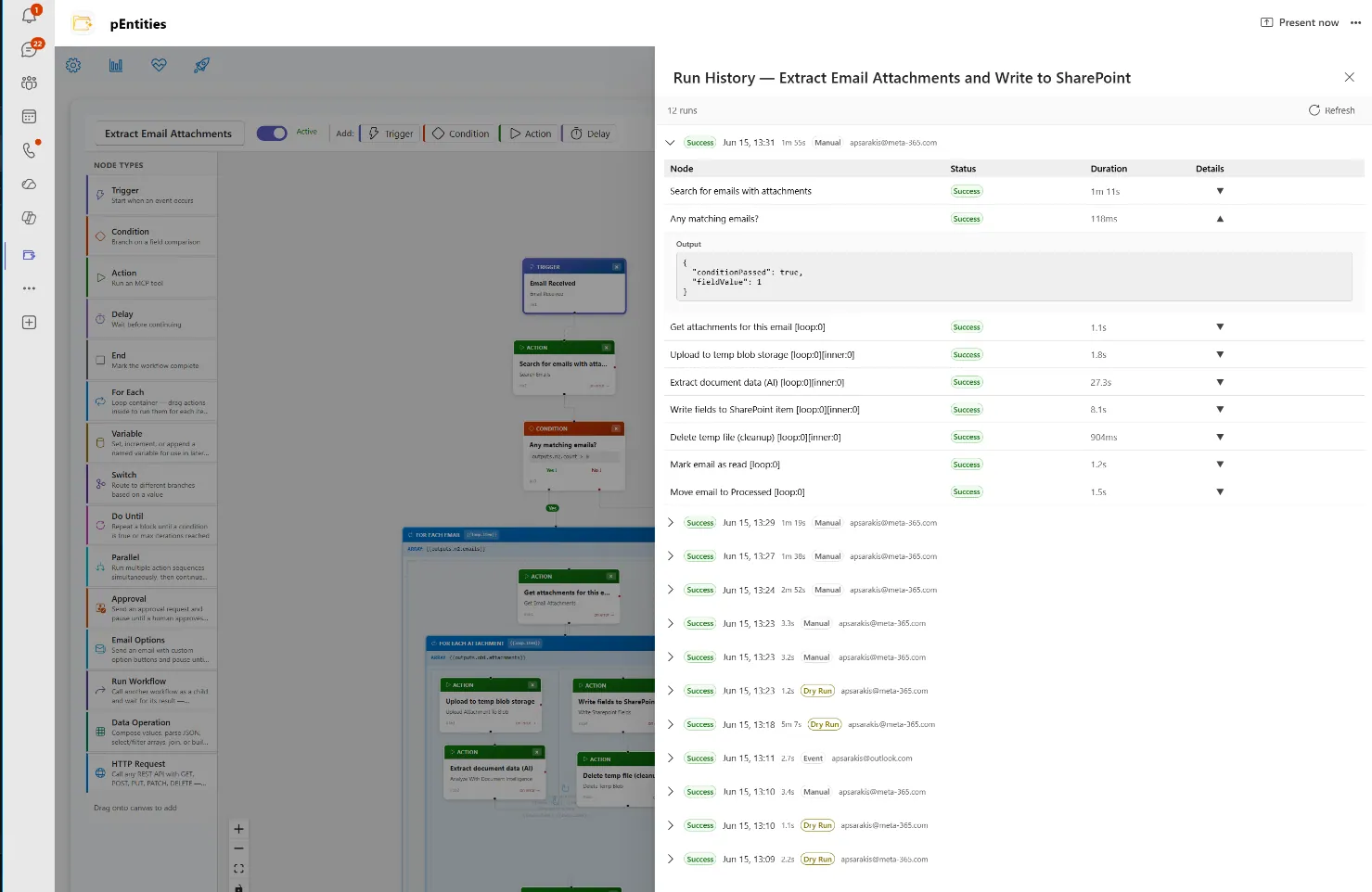
Twenty ready-made workflows cover the processes most organisations start with invoice handling, employee onboarding, contract renewal reminders, request escalation so the first one is running the same day.
Built for the real world and for your auditors
Workflows wait as long as a real process needs weeks for a signature, months for a renewal and recover from interruptions on their own, retrying a step that fails before escalating it. Safety limits stop a badly designed process from running away.
Everything stays in your own Microsoft 365 and Azure tenant: workflows, run history and logs are stored separately per organisation and encrypted, and each workflow runs with the permissions of the person who owns it never reaching data that person could not open themselves.
What if nothing ever slipped through the cracks again?
Approvals that route themselves. Deadlines that enforce themselves. Follow-ups that send themselves. Our automation platform runs inside Microsoft Teams no code, no third-party tools, no IT setup. Define the trigger, set the conditions, watch it execute. Every time. Precisely. Regardless of who's in the office.
See the platform in action
The same automation engine, wired into the work your teams actually do
Workflow automation powers every pEntities module each with its own domain AI agent, all running inside Microsoft Teams on the data you already own.
HR Module
The full employee lifecycle onboarding with automatic task lists, leave with multi-level approval, performance reviews, training tracked to its expiry date and payroll analysis. The HR agent spots compliance risks and writes the reports for you.
Explore HR →Legal Module
Every case tracked from pre-trial to appeal court, lawyers, opponents, confidentiality level, financial exposure and risk. Contracts carry milestones, auto-renewal detection and signature history, while the agent analyses timelines and exposure scenarios.
Explore Legal →Ticketing Module
Every request handled with precision IT, HR, finance or legal. Real-time tracking, automatic notifications, approval flows and full history, with priorities, SLAs and automation rules that work without anyone intervening.
Explore Ticketing →Finance Module
Invoices, expenses, purchases, budgets, receivables and tax data organised by fiscal year. Every figure links back to its original email, document and approval task full traceability, and an agent that spots trends and deviations.
Explore Finance →Frequently asked questions
Is this an alternative to Power Automate?
It is a simpler, flat-priced alternative for business process automation. Meta-365 provides a visual no-code canvas with 15 node types, 30+ triggers and 42 action tools, including branching, loops, parallel paths and dry-run simulation, at one per-tenant price rather than per-user premium licensing.
We are on legacy SharePoint workflows. What are our options?
Microsoft retired SharePoint 2013 workflows on 2 April 2026 and InfoPath on 14 July 2026, so affected processes must be rebuilt. The Meta-365 Workflow Designer is a self-serve replacement that runs inside your existing Microsoft 365 tenant.
Do I need a developer to build workflows?
No. Workflows are built on a visual drag-and-drop canvas with real-time validation and dry-run simulation, so business users can design and test a process without writing expressions or code.