Save, share and manage every Outlook email inside Microsoft 365
PShareEmail turns Outlook into a control centre for your content. Save emails to SharePoint, OneDrive or Teams, navigate every library from one pane, create shareable links, and track a sender's full history without ever leaving your inbox.
Your inbox, connected to everything in Microsoft 365
PShareEmail is a powerful Outlook add-in that changes how you handle email. Pick a destination in any document library and it automatically creates a folder named after the email subject and the time it was sent, containing an originalMail.pdf of the message together with every attachment a clean, self-contained record every time.
But it does far more than save. Send a message and its attachments to the tags of a Teams channel, or straight into a chat with specific team members. Browse OneDrive, Teams channel libraries and SharePoint sites to find documents and drop shareable links into new emails all from a single pane inside Outlook.
Native to Microsoft 365. Built with the Office JavaScript library and Microsoft Graph, it runs directly against your own tenant with enterprise-grade security no separate portal, no data leaving your control.
Everything email management needs, in one Outlook pane
Navigate, save, share and trace without switching apps or breaking your flow.
1 · Navigate your whole Microsoft 365
Open PShareEmail from the Outlook ribbon and see three sections OneDrive, Teams and SharePoint sites then drill into the libraries of each location to find exactly what you need.
- One interface OneDrive, Teams channel libraries and every SharePoint site you can access.
- Folder insight click a path header to see its metadata, or open a folder to list its files.
- Pin locations keep the destinations you use most one click away.
2 · Save emails as organised entities
Every saved email becomes a tidy, self-describing record the original message as a PDF plus all attachments, filed in a folder named by subject and datetime, with metadata you can set as you go.
- Automatic structure folders named by subject and time, with originalMail.pdf and attachments together.
- Flexible formats save as PDF, as .eml body, or the complete email with attachments as .eml.
- At scale save multiple emails, bulk-save attachments with metadata, and check for duplicates.
- Metadata & content types set default values and auto-create columns for From, To, Subject and more.
3 · Share straight to Teams
Move a conversation into collaboration without forwarding. Send the selected email and its attachments exactly where they belong.
- Channel tags send to specific tags of a channel, or to selected users within that tag.
- Direct chat send to specific team members in a new chat, attachments included.
- Channel libraries browse channels and their document libraries in the same pane.
4 · Shareable links & document preview
Find a document anywhere in Microsoft 365 and share it as a link, or preview it without leaving Outlook.
- One-click links create view-only shareable links copied straight to your clipboard.
- Insert anywhere drop links into new emails or a Teams chat.
- Preview in place open and work with documents directly inside Outlook.
5 · Sender history at a glance
Select any email, choose Sender History, and instantly see every message received from that sender preview or open any of them with a single click. Perfect for prepping a meeting or a follow-up.
Less inbox chaos, more organised, shareable, compliant email
PShareEmail removes the daily friction of filing, finding and forwarding and does it with the security your organisation already relies on.
Organised email storage
Automatic folder structures with subject and timestamp keep related emails and attachments together as entities easy to retrieve, easy to audit.
Seamless collaboration
Share emails and attachments directly to Teams channels or specific users, and create shareable links instantly instead of forwarding the same message again and again.
Unified access
Reach OneDrive, Teams and SharePoint from one interface no more hopping between apps to save an email or find a document.
Metadata control & compliance
Update metadata and content types as you save, apply default values, and keep categorisation consistent with retention and regulatory policies.
Complete email history
View every email from any sender with one click, keeping full context across your interactions.
Enterprise security
Built on Microsoft Entra ID with enterprise-grade security encrypted, and aligned with your Microsoft 365 compliance standards.
Runs everywhere Outlook does with the full toolkit
Supported environments
- Outlook for Windows, macOS and the Web
- New Outlook
- Outlook for Android and iOS
Search & navigate
- SharePoint Online, Teams and OneDrive for Business all from inside the app
- Outlook mails via Sender History
- Navigate every SharePoint library, Team / channel / files, and OneDrive
Save features
- Save to libraries, folders, Document Sets and lists including sent emails
- Save as PDF, as .eml body, or the complete email with attachments as .eml
- Rename on save, save multiple emails, and bulk-save attachments with metadata
- Check for duplicates before saving
Advanced features
- Pin locations and pin emails into the Entities app
- Update metadata & content types, with default values on SharePoint fields
- Auto-create SharePoint columns for email attributes (From, To, Subject, etc.)
- Create shareable links, preview documents, and open any location in the browser
Watch how PShareEmail transforms everyday email management
In a few minutes you'll see an email saved as a clean entity, an attachment shared into a Teams channel, a document link created without leaving Outlook, and a sender's full history opened with a single click.
Everything shown runs inside your own Microsoft 365 tenant, using the permissions your people already have.
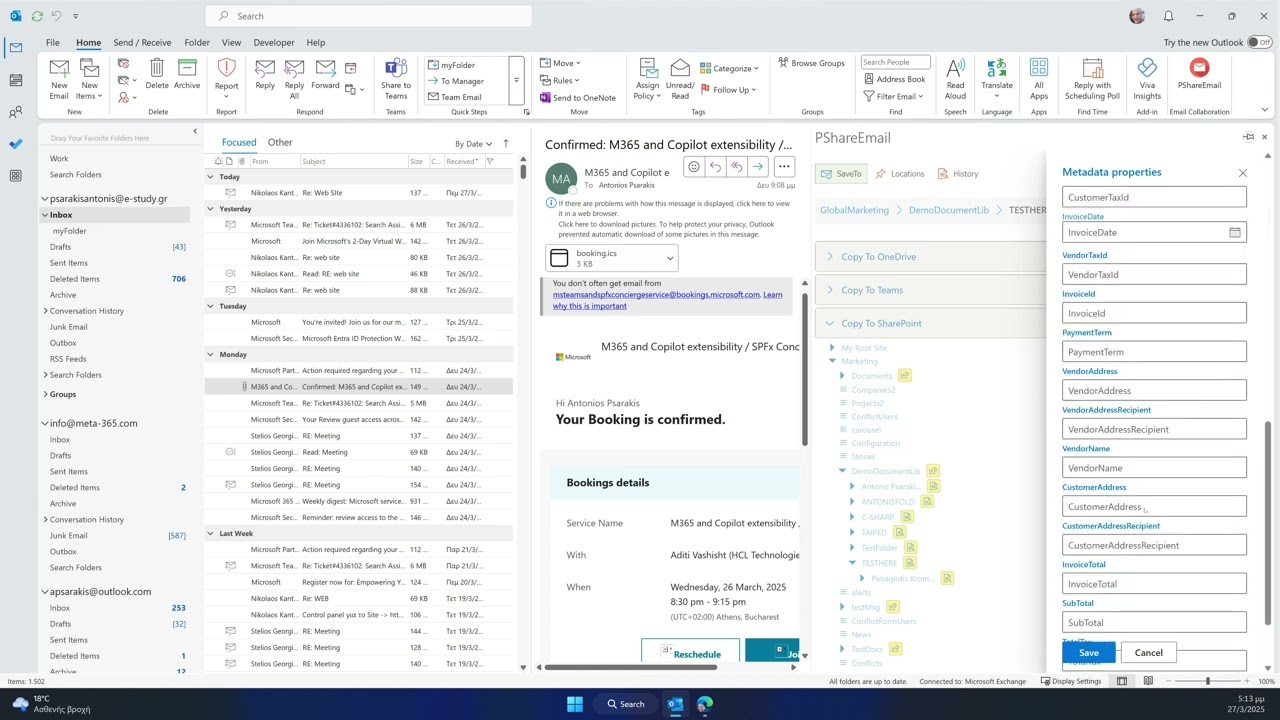
Click to watch the full presentation
Get PShareEmail Now
Download PShareEmail directly from Microsoft AppSource and start transforming your email management today.
PShareEmail is one piece of a connected Microsoft 365 suite
Pair it with the rest of Meta‑365 to unify content, search and automation across your tenant.
pEntities Platform
Turn contracts, cases, HR records and projects into living workspaces inside Microsoft Teams. Every record carries its documents, emails, tasks and approvals in one place, with a domain AI agent that reads the data you already own and surfaces the risks and next steps that matter.
Explore pEntities →DocSearch
Unified, permission-aware search and record management across OneDrive, SharePoint and Teams. Find any file, email or list item by content, metadata or type from a single box no matter where it lives and organise, preview and act on results without ever leaving Microsoft 365.
Explore DocSearch →Search Assistant
Find and act on the right content faster, with an assistant that works in the flow of your Microsoft 365 tools. Ask in natural language, get answers drawn from your own tenant, and jump straight to the file, email or record you need right where you already work.
Explore Search Assistant →Workflow Automation
No-code workflows that trigger on your own Microsoft 365 data and run themselves. Build multi-step approvals, notifications and scheduled routines that react to changes across the suite automating the repetitive work your teams do every day without writing any code.
Explore Automation →